Postingan

Menampilkan postingan dengan label Linux

How to Change Password in Linux

Gambar
User management is something very important in linux system. In linux, there is a kind of system that you would not find in other operating system, the system is called "user group". This kind of system will determine the privilege of each linux user, for instance a linux user that has not assign as part of www group would never able to access the file that  has a www group limitation. Well that's a very though explanation, now lets take a look, what if, you want to change your user password in linux which by default is passwordless? well in the next part of this article we will explain about how to change your password from linux terminal. How to Change Linux Password Before i show how to change your password, you must check which user you currently logged in, to check the user, you can enter this command on your terminal: id here is the result : user@asus:~$ id uid=1000( user ) gid=1000(user) groups=1000(user),4(adm),20(dialout),24(cdrom),27(sudo),30(dip),46(...


How to Install Google Chrome on Linux Ubuntu

Gambar
Introduction of a Web Browser a Web browser is the heart of the web system, the web browser is what change the way of application programming playing it's role on the technology stuff. Web browser is an application that used to retrieving, getting data, pulling and traversing  data information for the world wide web. A single information from a web is defined by the URL (Unified Resource Locator / Unified Resource Identifier, by using web browser we can get a lot of content type like: text, audio, video even a program can be access trough the web browser. Google Chrome on Linux Google chome is a freeware developed by Google company. Google chrome is a web application that is used by a lot of people. By default, a lot of linux variant doesn't make google chrome package as a pre-installed application, so whoever wanted to use this application in linux terminal, for example, now i used ubuntu as my operating system, but i don't have google chrome installed on my linu...

How to Unzip in Linux

Gambar
  Introduction Zip is the most used file compressor  in windows operating system, it is a pre-installed application that is avalaible  when we installed the windows operating system on PC. Basically, most of linux operating system like ubuntu, debian RedHat etc. doesn't make "Zip" as a pre installed packages in the system. So, if linux user wanted to unzip a "zip" file, he need to install "unzip" package before he can unzip file. How to Install Unzip and File Roller in Linux Command Line (Terminal) here is an example how to install unzip packages from linux command, you need to run this command: sudo apt-get install unzip file-roller The command bellow can be used by debian or ubuntu OS's user. package "file-roller" is a GUI interface of unzip application so i include it, to make it easier for GUI user. Here is the result from the command bellow: sudo apt-get install unzip Reading package lists... Done Building dependency ...

How To Display Current Directory In Linux Command Prompt

Gambar
Display Current Directory in Linux Terminal Hello everyone, today we will talk about how to show what is the address of current working directory in linux terminal . This  information is needed while we working on linux terminal and we need to know where is our working directory right now, this information can be retrieved by using PWD command. PWD Command PWD is abreviation of Print Working Directory, this command can be used to get the information of current location of directory tree. How to Use PWD? here is an example how to use PWD command to show the information of our current directory tree location, run this command in your terminal linux : pwd and here is the result : elbirtus@asus:/opt/lampp$ pwd /opt/lampp Based on the result, now we have an information that, our current working directory location is in : "/opt/ lampp " 

How to Compare Difference Time between two Linux

Gambar
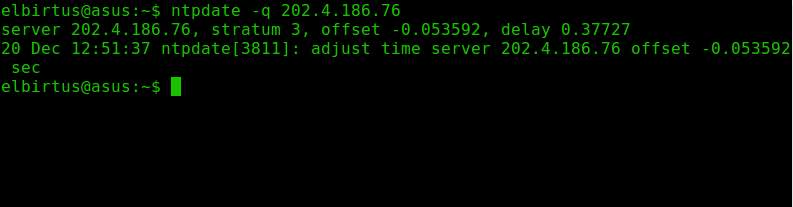
Comparing difference time between two linux operating system is needed to make sure a computer time is equal to the other computer, this affair commonly used by researcher to synchronize 2 pc that used linux operating system. One of linux package that is able to compare the difference between two PC is “NTP”. PC spesification used for this tutorial : Debian 7 OS Intel i5 CPU ASUS motherboard lxterminal or gnome terminal Introduction NTP is abreviation of Network time protocol, this package is an operating system daemon that has an ability to syncrhonize the clock time between two computer. Determining the time difference Before we calculating the time difference between two PC, just make sure that one PC is running an NTP server daemon: Download NTP Server to download ntp server daemon you can use this command in linux terminal: (if one of your PC has this package installed, just ignore this step) sudo apt-get install ntp here the result : root@elbirtus:/...

How to Install SLIMS Akasia 8 On Ubuntu Linux

Gambar
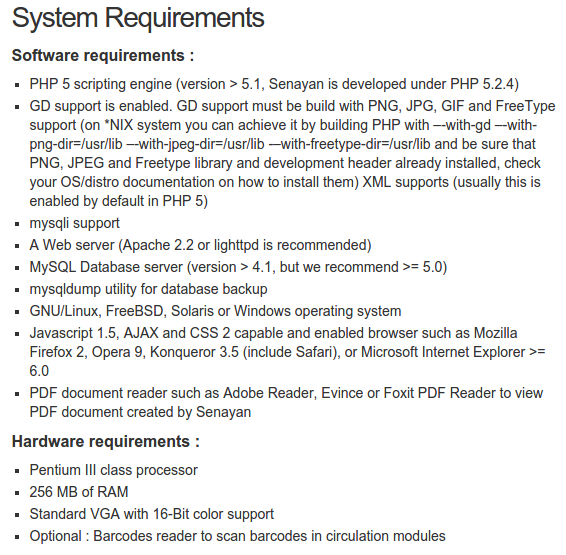
Introduction SLIMS (Senayan Library and Information System) is an Open Source Library Management software that used PHP as it programming language. SLIMS is well known as a Library management application that used by a number of university and government agencies in Indonesia to make their library stuff getting easier. This software has a lot of features, for instance : Circulation’s Features This module covered the circulation stuff. a user who wanted to borrow a book, will be recorded through this module. Bibiliography Features This module covered detail biblio (book) information. Every book’s information will be recorded through this module (tittle, author, published placed, etc.) OPAC (Open Public Access Catalogue) Features This feature is a standard online book’s catalog. By using this feature, anyone can search some information about a book, like : where is it location or is it available or on loan Installation This part of tutorial will covered some information a...